


I want to go straight from my Xbox 360 to show up on Windows Movie Maker but because I'm on Vista I don't know how to do this, apparently it's ctrl + R but that's for video cameras.. I don't know how to do it for capture cards.
Thanks.



Results 1 to 10 of 13
-
 Dazzle - Vista - Windows Movie Maker?
-
I'll just use Studio 10 to record and maybe I'll import it to edit it with Sony Vegas or something but now when I go to launch it to do the recording I get this error:
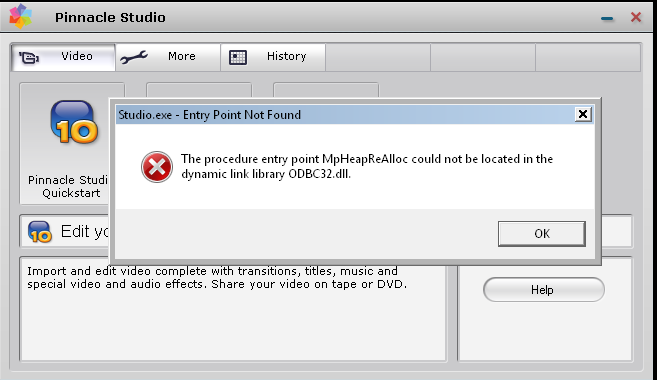
I've searched for the dll but all it finds is some programme called RegCure which isn't what I'm looking for, any idea how to fix this and get it working?
-
reinstall the software? for the DLL error
Never argue with an idiot, he'll drag you down to his level, and beat you with experience.
And 15 mins later... Originally Posted by Recursion
Sapphire ATI Radeon HD 5850 1024MB GDDR5 PCI-Express Graphics Card £195.73 1 £195.73
*ordered.
-
Try Sony Vegas like you suggested babe. Even though it looks quite complex.
-
-
Everything is connected and everything, I downloaded Sony Vegas but I've no idea how to get it to show on the capture screen. My mate suggested DScaler and I've done a Google search and quiet a few people fort it was good so I downloaded it but everytime I select Dazzle the programme just doesn't respond.

-
08-06-2008, 09:05 PM #7DarrenToogood Guest
I get the same problem with Pinnacle. Its not compatiable with Vista.
-
It is, there is working drivers you can get. Originally Posted by DarrenToogood

-
I use sony vegas. Originally Posted by brandon
Does your xbox show up on your computer network connections? / Can you access it from your computer
-
No I can't.

 Reply With Quote








 Posting Permissions
- You may not post new threads
- You may not post replies
- You may not post attachments
- You may not edit your posts