



Well, basically when I'm playing WoW i'd have to minimize to read the guide or even to talk on Msn.
Is there any program that like splits my monitor into 2 sections, one for WoW and another for a choosing of my desire, for eg, Msn, Mozilla etc...
Thanks ;]



Results 1 to 10 of 12
-
 Is there any program that does this
Borat is our leader, respect him just like he respects his country (cba to say kazakghsgtan)
Is there any program that does this
Borat is our leader, respect him just like he respects his country (cba to say kazakghsgtan)
-
Just run WoW in windowed mode.
-
Yes, run it in windowed mode. I think you can do this by going to task manager and right clicking. Look in the options..
or right click the program on your homepage and look the options to see if it says windowed mode
-
Press ALT and ENTER at the same time.
:8 Originally Posted by Chippiewill

-
25-10-2008, 08:38 PM #5
If you have two monitors you can

-
If you have two monitors, you can split them so that you can move, and maximize, windows on either one of the monitors.
I think it would be good if there is a setting or maybe a program that can split your monitor in half and treat it like this? That is also what he is looking for.Kind Regards,
Guy__________________
Since 2007. Unbelievable Uptime. Web hosting, resellers, master resellers, linux VPS, windows VPS, shoutcasts, at the lowest prices on the net.
Tech-Hosts.co.uk.
-
Right click on the short cut to wow, click properties, then advanced and there should be an option to open in 800 x 640 window or something like that.
Lets set the stage on fire, and hollywood will be jealous.
-
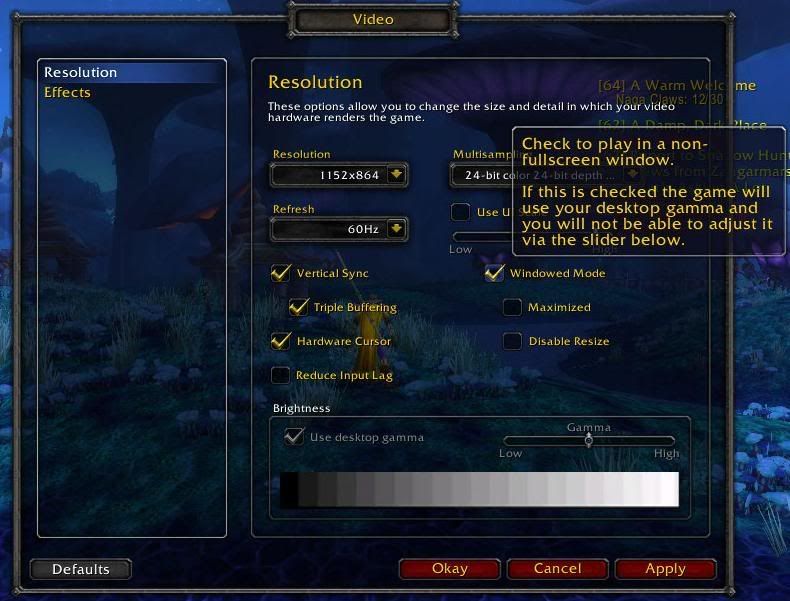
In game press Esc, go to video and select windowed mode (the way the other's described won't work
 )
)


-
I tried that with spore and FSX, it raped my video card... Originally Posted by Jack120
Conductor of the Runaway Train of Militant Homosexuality
-
How could you possibly play Spore and FSX at the same time? :S It shouldn't even run.
:8 Originally Posted by Chippiewill

 Reply With Quote












 Posting Permissions
- You may not post new threads
- You may not post replies
- You may not post attachments
- You may not edit your posts