



Hey
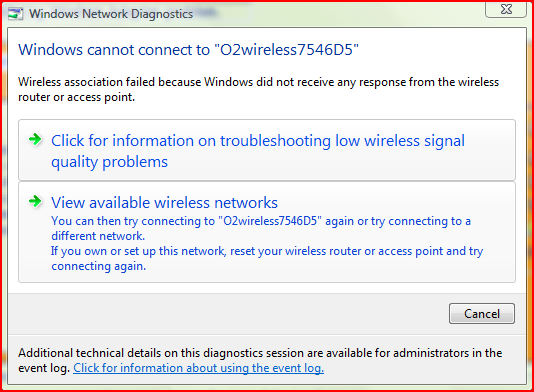
I have this really annoying problem, I got a ASUS 802.11g wireless adapter (PCI) card and before I changed my mobo it worked perfect without a fault. I now changed the motherboard to a GIGABYTE GA-EP31-DS3L, and now the WiFi card won't working properly. It displays the Wireless Networks, but whenever I try and connect I get "Windows cannot connect to this wireless network." When I click on Diagnose It will then show the following:
When I tried the card downstairs on a XP computer it worked flawlessly. I'm running Windows Vista Ultimate 32-bit.
I've tried the following steps:
- IVE TRIED GOOGLE SO DON'T POST LINKS FOR GOOGLE
- Downloading latest drivers
- Uninstalling and reinstalling wifi card
- Reinstalling OS
- swapping the PCI slots
Hope you can all help me because to be honest, I am running out of ideas.
Thanks,
Chris
P.S Sometimes the card will connect but with wrong IP or just doesn't do anything once connected.
Moved by MattGarner (Forum Super Moderator): From; Technology Discussion, Please post in the correct section next time. Thanks



Results 1 to 10 of 14
-
 ASUS 802.11g Wireless Adapter problem.
Last edited by xxMATTGxx; 27-01-2009 at 03:31 PM.
Never argue with an idiot, he'll drag you down to his level, and beat you with experience.
And 15 mins later... Originally Posted by Recursion
Sapphire ATI Radeon HD 5850 1024MB GDDR5 PCI-Express Graphics Card £195.73 1 £195.73
*ordered.
-
26-01-2009, 07:42 PM #2

http://www.fixya.com/search/p305904-...er/not_connect
Have you any other wifi cards to try?
is other computers connecting to the network wirelessly?
is wireless enabled on the router?
is your router got security set up?
is encryption key put into your comp?
can you connect to any other networks? (if you can try)
also a hint; your thread title ends in "problem" this is tech "discussions" theres a section tech "problems" better suited.

-
1. no Originally Posted by entrance

2. no (except laptop but they have never interfered)
3. obv. yes
4. Yea (Tried disabling and connecting)
5. yea
6. no
7. Oh well **** happens
Never argue with an idiot, he'll drag you down to his level, and beat you with experience.
And 15 mins later... Originally Posted by Recursion
Sapphire ATI Radeon HD 5850 1024MB GDDR5 PCI-Express Graphics Card £195.73 1 £195.73
*ordered.
-
26-01-2009, 07:50 PM #4
Originally Posted by Flisker
1. ok Originally Posted by entrance
2. ok
3. ok
4. ok
5. ok
6. no as in you can't try or no you can't connect to other laptops?
7. indeed it does
whats the actual name of the wifi card, instead of just 802.11g
-
Well, at the moment I've bridged the connection on my laptop for internet, however it's slow. Originally Posted by entrance
Never argue with an idiot, he'll drag you down to his level, and beat you with experience.
And 15 mins later... Originally Posted by Recursion
Sapphire ATI Radeon HD 5850 1024MB GDDR5 PCI-Express Graphics Card £195.73 1 £195.73
*ordered.
-
Lol Chris!
Good luck fixing it
*Posts a google link* Mwahahaha!
-
Thanks Brad Originally Posted by Berch
It's really annoying me because I've tried for ages to get this to work.
Never argue with an idiot, he'll drag you down to his level, and beat you with experience.
And 15 mins later... Originally Posted by Recursion
Sapphire ATI Radeon HD 5850 1024MB GDDR5 PCI-Express Graphics Card £195.73 1 £195.73
*ordered.
-
26-01-2009, 08:14 PM #8
whats the actual name of the wifi card, instead of just 802.11g
-
ASUS WL-138g_V2
Never argue with an idiot, he'll drag you down to his level, and beat you with experience.
And 15 mins later... Originally Posted by Recursion
Sapphire ATI Radeon HD 5850 1024MB GDDR5 PCI-Express Graphics Card £195.73 1 £195.73
*ordered.
-
26-01-2009, 08:21 PM #10
http://www.newegg.com/Product/Produc...82E16833320022
Cons: The wireless utility that comes with this card did not work right for me. I could not maintain a connection using the bundled software. Other Thoughts: I uninstalled the utility that came with the card and let Windows manage it. Since then I've had no problems.

 Reply With Quote



 Posting Permissions
- You may not post new threads
- You may not post replies
- You may not post attachments
- You may not edit your posts