


Ok, so ive got a desktop computer and i want to use my technika 26 inch lcd tele as the monitor.
I dont know if anybody has a Technika television, but mine does NOT have a VGA input, only HDMI.
However my computer only has a VGA output, not a HDMI.
The tv also has no s-video input, just hdmi and scart.
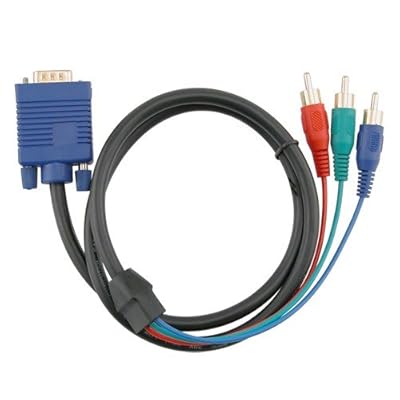
I purchased a HD RCA cable with a VGA end, but that doesnt work for some reason, i looked on the internet and apparently they dont work?
If anybody has one of these, can anybody tell me how to get it to work, if they even do?
If not, can somebody tell me how id go about getting my computer to appear on my tv.
Thanks! +Rep btw



Results 1 to 10 of 18
Thread: Computer to TV? [+REP]
-
 Computer to TV? [+REP]
-
Easiest way is a new graphics card.
AMD Phenom X4 955 BE - 8GB RAM - Asus M5A97 - MSI HD6870 HAWK - Windows 8.1 Pro 64 - Samsung 840 Pro 256GB
-----------------------------------------------------------
-
They're not exactly cheap lol?
-
I have a technica tele, mine has the VGA input though

You can get a cable to go from VGA output to hdmi input
http://cgi.ebay.co.uk/1-8m-VGA-to-HD...item5191e5738a
They're fairly cheap, not sure how HD quality that would actually be but it does the job.Joe

-
It's not gonna happen without some pretty expensive scan conversion hardware. Buy a cheap graphics card with a DVI output and go DVI->HDMI.
-
And that should work yah?
-
or alternatively buy a cheap graphics card with HDMI and cut the converting altogether.
And joe's suggestion won't work, you can't convert an analogue (VGA) signal into a digital (HDMI) signal. or something like that.
Something like http://www.ebuyer.com/product/182095 is the cheapest solution possible, but make sure the desktop has PCI-E. If it doesn't, get http://www.ebuyer.com/product/169448AMD Phenom X4 955 BE - 8GB RAM - Asus M5A97 - MSI HD6870 HAWK - Windows 8.1 Pro 64 - Samsung 840 Pro 256GB
-----------------------------------------------------------
-
I don't see why not yea :S
I use a VGA to VGA for my technica and it works fine , worth a go and if not sell it onJoe
-
My technika doesnt have VGA input, is it hidden or something because its not on the back?
Mines a technika 26 inch black lcd, whats yours?
-
you use a VGA to VGA. Thats an analogue signal to an analogue signal.
HDMI is a digital signal. whereas VGA is analogue, so whereas VGA > VGA would work (but not in Jayme's instance), VGA > HDMI wouldn't. I don't know why, it just doesn't.AMD Phenom X4 955 BE - 8GB RAM - Asus M5A97 - MSI HD6870 HAWK - Windows 8.1 Pro 64 - Samsung 840 Pro 256GB
-----------------------------------------------------------

 Reply With Quote







 Posting Permissions
- You may not post new threads
- You may not post replies
- You may not post attachments
- You may not edit your posts