


Below, are just a few settings that is a "must" before using SAM Broadcaster live on air, and a couple of other things, that you may not know. The reason for this thread, is because i know more than half the DJ's out there now days have no idea about these settings. In the past two months, i have spent my time on TeamViewer changing over 15 different DJ's SAM Settings to the appropriate settings. This is helpful for current DJ's and for people considering to apply for the DJ team.
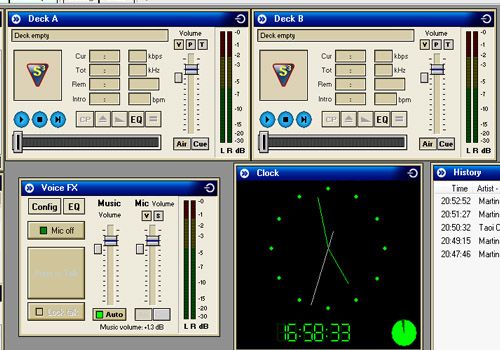
In this picture, you will find the appropriate deck & mic settings. As you can see on both decks, the volume is on the "last" line & not above it. Any higher, the quality will start to sound buzzy, as same to the mic settings below.
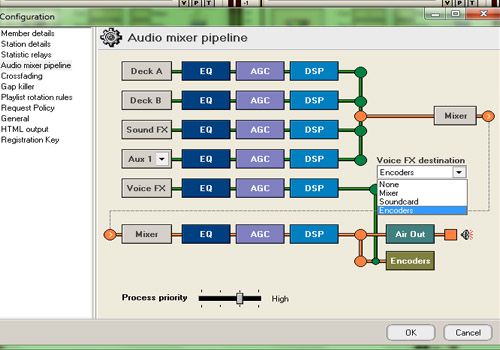
All you have to do here, is go to the pipeline settings in config, and on the right, change "mixer" to "encoders", so that when you are on air, the listeners are able to hear what you are playing.
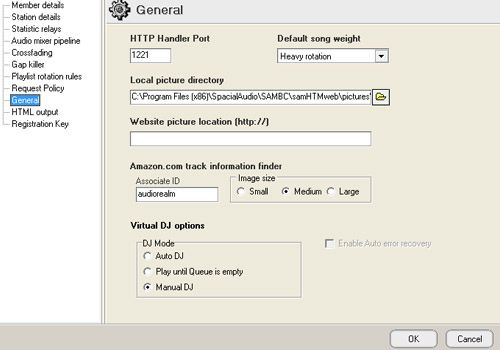
This is a must. Go to general settings and change it from Auto DJ to Manual DJ. If on auto, it change songs a few seconds before the current playing track actually finishes & will sound real bad most times. You can also change it top left corner of SAM Broadcaster.
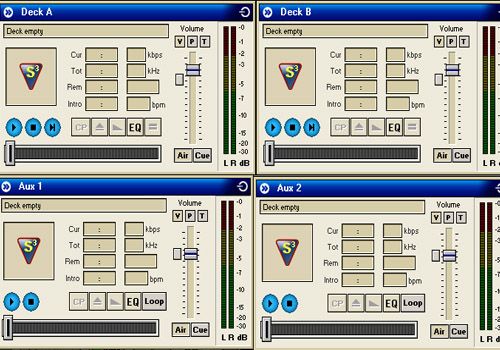
What is Aux? They are usually used at non Habbo fansites for more decks, or for more jingles. As you get more pro at using SAM, you can get better at doing some voice over through a song, leading into a jingle & into another song or jingle. You can't do that with only 2 decks that well. The main use, of Aux.. is for IceCAST users (Can still be used on SHOUTcast). For more info, read below.
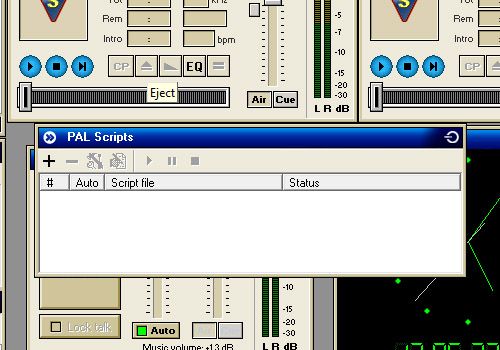
PAL Script is used for brought, professional jingles. People set up a time, for an example... 15 minutes. So every 15 minutes, a Jingle will pop up in the Queue and play after the current track. Please note, it'll only play through the Aux decks, as above. All you got to do, is click the +, and add the jingles, with the settings.
Results 1 to 2 of 2
Thread: SAM BC DO's & MUST's
-
 SAM BC DO's & MUST's
Last edited by Milarz; 16-02-2013 at 02:32 PM.
-
A couple of handy tips there. I also use the auxiliary decks for competitions - I'll play something, maybe the opening of a song or a soundtrack and as it doesn't come up on the server/now playing it stops people from cheating (at least that way ha).
I've decided to add a few tips of my own including some general presenting tips:
(1) Don't mess with the music, Microphone sliders - I've had presenters in the past not realising that the sliders auto adjust e.g. when you press to hold the microphone comes up and the music goes down. Even after being told I've had people messing with them themselves but forgetting to reset them - what then happens is after they finish talking their music is very quiet - it's always good to keep a stable level.
(2) If you go anywhere turn on Auto-DJ - One of my station's biggest rules is always have something on - if you pop to the loo turn on Auto-DJ - It simply means if you take longer than planned or something happens, when the song finishes something else will play. The handy thing with Auto-DJ to is if there's anything in the queue it will play them first so you can have some planned back up music.
(3) Remember to turn your mic off when music is on - Sounds simple but it's easily done. Years back when I first started presenting using Winamp I often did this a few times. People will hear any background noise and the music won't be load.
(4) Don't type when talking/have all other programs muted - Another thing I used to be guilty of when I ran my first station (as a hobby back then). If your talking remember people don't want to hear typing or other programs e.g. Skype, MSN.
(5) Plan your show - I know a lot of people just come on and play music and do a lot of stuff on the fly, I did when I first started. However a good show is usually one which has at least some thought to it. I find even just making a playlist can help - it gives you a load of music ready - handy if no requests are coming in or you want to play something while you sort requests out.
(6) Speech - Speech is an important part of radio. One problem can be presenters pausing a lot or using filler words such as erm. Planning your show as mentioned above can help prevent this as you always have something to do, discuss etc.
(7) Interaction - I've met a couple of online station owners who just play music and that's it. The way I and many others see it is that's what YouTube is for. If people are listening via a computer and most will be, they'll have access to YouTube, their own music collection etc. The question I ask presenters is how would you keep a listener tuned in if she didn't like a few of the songs - the answer being by giving great content between the songs, getting the listeners involved.
(8) Presenters are not announcers - The worst and most common thing for presenters to do seems to to me, presenters who just announce. By announcing I mean simply telling the listeners what has just played and what is coming up. Most listeners will be able to see this via the player anyways. Most listeners will want interaction as we just previously mentioned.
(9) Voice-Tracking - A lot of people don't use Voice-Tracking and it can be quite handy - basically it allows you to record segments and save them, add them into the queue etc. It helps with planning shows as you have pre-recorded content you can add in during your show. Pre-Recorded clips in general allow you to often fine tune them and edit them unlike live content. I always recommend doing live shows but its handy to some some pre-recorded clips even if short.
(10) Avoid talking about listener numbers - If you've been on a station with low listeners its easy to start asking people to help promote it and there's nothing wrong with that but its always a good idea to make stations sound like they are more popular than they are. A lot of people may not like a station/show if they realise they are one of just a couple of listeners.

 Reply With Quote


 Posting Permissions
- You may not post new threads
- You may not post replies
- You may not post attachments
- You may not edit your posts