



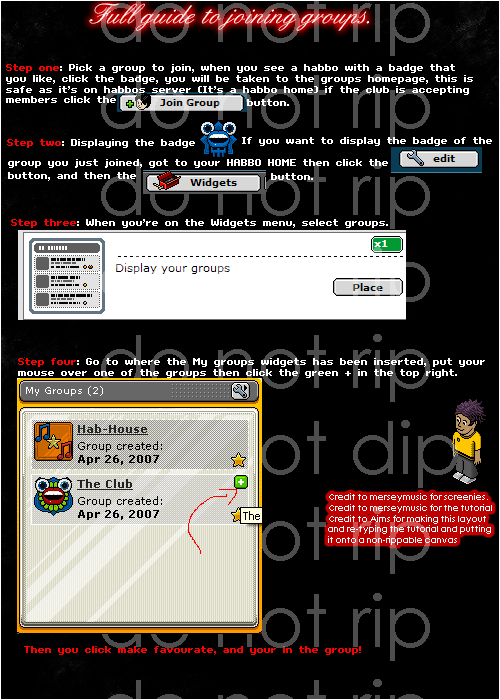
Hey, alot of people need help making and joining groups so here is a tutorial
Step one : pick a group to join.. when you see a habbo with a badge you like click that badge... you will then be taken to that clubs homepage... this is a safe page as its on the habbo server (its a habbo home) If the club is accepting members then click thejoin group button.
Step two: displaying the badge
If you want to display the badge of the group you just joined go to YOUR HABBO HOME, then click the
edit button, then click the
widgets button,
Step Three: when your on the widgets menu select groups
Step four: go to where the my groups widget has been inserted, put your mouse over one of your groups... then click the green plus in the tp rightthen the box will extend and you will see this
click make favorite and you will then display that badge
Notes
You can only have ONE favorite
you can join as many groups as you want (as far as i am aware)
if you think i have posted anything wrong here, missed anything out or have any comments / questions post them here. thanks and i hope this has helped
Results 1 to 10 of 26
Thread: Full guide to Joining Groups :)
-
 Full guide to Joining Groups :)
Joe
Full guide to Joining Groups :)
Joe

-
This guide is helpful. Yesterday, I was like, OMGzz where is my badge?
shawn
-
Thanks
Joe
-
-
thanks +rep back
Joe
-
-
LOL ^
nice guide.
-
I do beleive i have already posted this?
-
I re-wrote this for you dude.
You can use this image.
Sticky this thread pls. 547 :big_grin:
-
There's a limit to amount of groups I think. I had a limit..
drink up this bottle of yeah
and P A I N T your body on me


 Reply With Quote







 Posting Permissions
- You may not post new threads
- You may not post replies
- You may not post attachments
- You may not edit your posts