





Okay I'm looking for a new keyboard as I'm sick of my wireless one and it's not much good for touch typing.
Basically this is what I'm hoping for, it doesn't need to have all of these though:
USB Ports built in preferably
Luminous keys (Backlight)
Programmable Macro Keys
Anti-RSI pad
I quite liked the G11 as it had all the above, but when I actually saw it today, the keys are extremely old fashioned and it's not really that great for typing.
The priority is touch typing quickly.
I've had a look but can't find anything else, I'm happy to buy from anywhere online and I've got a fair budget of £50
The other thing I need is a Vista compatible Bluetooth device, just £5-10 which you personally recommend. I've used quite a lot but they all seem to have problems. Please only suggest one you've actually used
Thanks
Results 1 to 8 of 8
Thread: Two Things
-
27-09-2008, 05:51 PM #1
- Join Date
- Dec 2006
- Location
- Nottingham
- Posts
- 7,752
- Tokens
- 756
- Habbo
- katie.pricejorda
 Two Things
Last edited by Jordy; 27-09-2008 at 05:52 PM.
-
my mikomi 1 isnt bad. £3.99 :]
Works fine on my inspiron 1501 - Vista Home Premium, 32 bit
-
One of those Saitek II keyboards?
:8 Originally Posted by Chippiewill

-
If you can touch type, why do you need backlit keys?

There aren't a great deal of backlit keyboards, and the ones that are are primarily designed for gaming. If you wanted something good for typing, you could try a Microsoft Ergonomic Keyboard 4000. If you wanted a more standard layout with backlighting, try a Saitek or Logitech G15.
-
Saitek eclipse 2. Or if you're really loaded Saitek Cyborg but they're £60
EDIT: Just read all the first post because I'm scatterbrained like that. The eclipse 2 only has dedicated media controls. The cyborg has lots of programmable keys down the sides though. I have no idea what an anti-RSI pad is so I'll leave you to judge that oneLast edited by The Professor; 27-09-2008 at 10:25 PM.

-
27-09-2008, 11:05 PM #6
- Join Date
- Dec 2006
- Location
- Nottingham
- Posts
- 7,752
- Tokens
- 756
- Habbo
- katie.pricejorda
Anti-RSI is to prevent RSI (Repetitive strain injury), it's quite common if you regularly use PCs many hours a day on a unhealthy basis. Lots of keyboards have precautions to stop this such as tilting upwards, but you can buy Anti-RSI Pads for the bottom of keyboards which some how help stopping you get it. Originally Posted by Professor-Alex
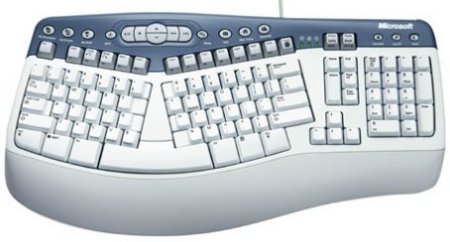
The big white bit at the bottom is it
Lots of school's and business's often require them for health and safety.
I've decided I'm going to bare with the keys and go for the older model of the G15 :8 - Thanks for your help anyway

The older model is much better than the newer model, first of all it has loads more Macro keys, it isn't an ugly orange and the LCD screen can be moved
Last edited by Jordy; 27-09-2008 at 11:06 PM.
-
Is the LCD screen for IRC?
-
You can download "apps" for it to do different things, IRC, system info, XFire, music, you name it.
Last edited by Recursion; 27-09-2008 at 11:16 PM.
:8 Originally Posted by Chippiewill

 Reply With Quote






 Posting Permissions
- You may not post new threads
- You may not post replies
- You may not post attachments
- You may not edit your posts