



Yreah I'm havingf some keyboard trouble
Whren I type some keys, more than one letter comes up :S
eg.
when i press 't'
tf
'r'
rf
'e'
ec
sometimes the letters look completely random, other times, its like the dictionary on mobile phones
arghhhhhhh
really appreciate any help!!!!
this post took ages lmao
Results 1 to 6 of 6
Thread: Keyboard trouble [+ rep]
-
 Keyboard trouble [+ rep]
Edited by Garion (Forum Super Moderator): Please do not have images in your signature that exceed the 150 Pixel height limit for your usergroup.
Keyboard trouble [+ rep]
Edited by Garion (Forum Super Moderator): Please do not have images in your signature that exceed the 150 Pixel height limit for your usergroup.
-
06-02-2009, 12:02 AM #2

Ill PM you something that I sent to someone earlier today. They had the same exact problem.

Okay here it is

Okay you will need to look at the notch by the area labeled lights. The notch is on the end of the laptop.
You will need to get a flat surface and push that up. Once you have done gently run the knife down the grey bar. Once you have it succesfully popped out it should look like this:
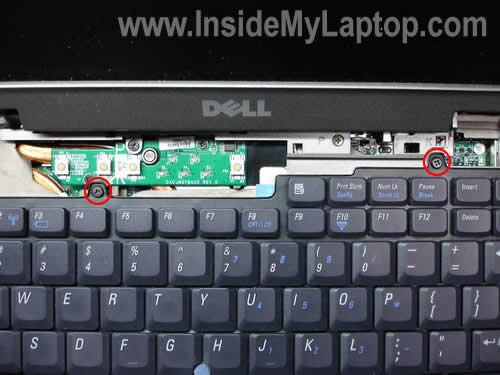
Then you will take out any screws and then it will look like this:
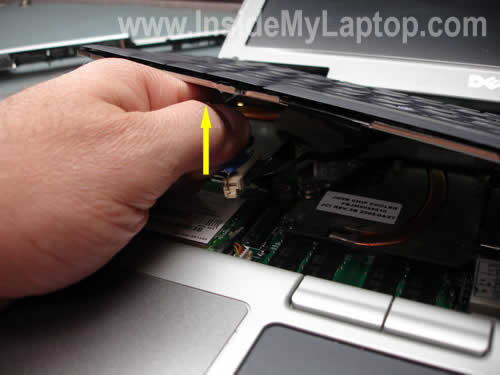
Simply lift it up out of the CPU Chip and Bam! you have succesfully removed your keyboard. Like I stated. Look for any water. Wipe it or let it air dry. Look for any burnt marks or broken wires. Hope this Helped! __________________
Posted merged - Wayne (Forum Super Moderator)Last edited by Wayne; 06-02-2009 at 11:27 AM.
User: cazzzaDate: Mon Oct 26, 2009 @ 10:56 pmMessage: JB u will be remembered as a legend to everyone love you
-
thank you liger boy
i'm going to try that in the morning
tyvm for replying!
Edited by Garion (Forum Super Moderator): Please do not have images in your signature that exceed the 150 Pixel height limit for your usergroup.
-
06-02-2009, 02:34 AM #4
Your Welcome. Also It may help me even better if you tell what kind of laptop you have that is a Dell Latitude D610. the one I have
User: cazzzaDate: Mon Oct 26, 2009 @ 10:56 pmMessage: JB u will be remembered as a legend to everyone love you
-
its a dell inspiron 1520
i haven't done those steps yet, waiting for my dad to do it instead
but now i'm more concerned my 'c' key doesn't work at all now :confused:
i took the key off and it doesn't work that way either... :SEdited by Garion (Forum Super Moderator): Please do not have images in your signature that exceed the 150 Pixel height limit for your usergroup.
-
i followed those steps and it didn't work

now it's the 'c' and 'f' that don't work
arghhhhhhhh
seriously it was fine last night and it was literally out of the blue
one minute i'm typing normally next minute it goes weird!
btw i'm copy+pasting the 'c' and 'f' :\
but thanks again for your help
any other suggestions, anyone?Edited by Garion (Forum Super Moderator): Please do not have images in your signature that exceed the 150 Pixel height limit for your usergroup.

 Reply With Quote


 Posting Permissions
- You may not post new threads
- You may not post replies
- You may not post attachments
- You may not edit your posts