


If this should be in a tutorial forum, or there is already one, then please close or move and I'll be very sorry
Recolouring with MS Paint, Picture Tutorial, by .:.:.Sammeth.:.:.
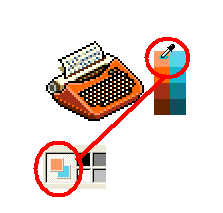
1. Select the item of furni, or habbo graphic, that you wish to recolour and paste it into a new paint pad. Using the Colour Select tool () get all of the colours and make them into a chart from lightest shade to darkest.
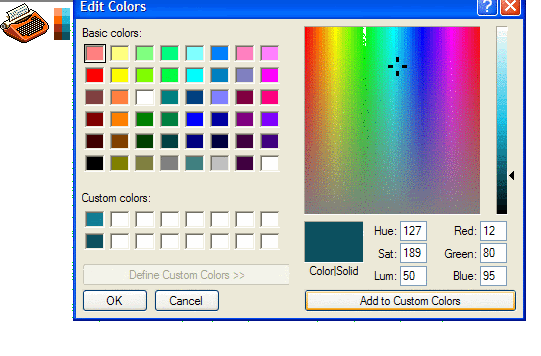
2. Then go into "Colours > Edit Colours" to select brand new colours for each shade. Place these new colours next to the corresponding shade.
3. Use the Colour Select tool (
4. Now using the ERASER tool, hold down the right hand button and roll the mouse over the item of furni. This recolours every old coloured pixel with the new colour you selected! Do this for every shade, and there you have a recolour - easy as pie in the easiest image editor in town!
Repeat with all shades
Hope this guide helps anyone wanting to start recolouring, and are doing it pixel by pixel!
.:.:.Sammeth.:.:.
If anyone is unsure about anything in this tutorial, please PM me, and I will try and make it easier XD
Eeek! Okay, I posted it here because I thought people who post recolours woul benefit most from it would see it, but please move to the Tutorials section
Results 1 to 10 of 15
-
 Easy Recolouring Guide - With MSpaint!
Last edited by Sammeth.; 26-11-2006 at 03:49 PM. Reason: Request
 Sammeth.
-
nice tutorial. Very well explained

+rep
-
-
Ty for replies. I hope it does, but if the mod of this forum sees it, he will probasbly move it to Tutorials and Guide, though it would be bettter in this forum *wink wink hint hint*
Sammeth.
-
I made a pink one, soz about the white border though

-
Nice guide + rep.
-
This thread should be stuck.
It's brilliant .
-
I've seen a similar guide (http://www.habboxforum.com/showthread.php?t=50929) but I guess this one's more straight forward and the explanations are easy to understand‹3
jen&hev4eva
-
Ty people xx Thanks for comments XD I'm not sure whether it will get moved or not.
Sammeth.
-
02-12-2006, 03:25 AM #10

Very cool guide! Look!

All thanks to your guide
Should be stuck.
Ver. Originally Posted by Special-1k





 Reply With Quote











 Posting Permissions
- You may not post new threads
- You may not post replies
- You may not post attachments
- You may not edit your posts