


Hello! Well after I boot up vista I go through all the usual stuff, the vista loading bar going left to right, then after that instead of the Vista pearl I just get a black screen. It isn't a 'no signal' or out of range just the cursor (movable) and a black screen. I have not changed anything except a new graphics card about a week back and there were no problems. I was playing WoW and my computer froze, took a restart to get back on and I hit this black screen problem. I have trued safe mode, turning off the psu for 7 seconds so the motherboard can reset.
Any help would be great.
Chi.
Results 1 to 5 of 5
-
 Black screen after Vista loading bar
-
04-01-2009, 11:16 AM #2

Try reseating your gfx card
Try resetting CMOS on your mobo
-
So, try reseating gfx card and resetting CMOS on the mboard. Do you have any idea to the causes of this problem? Graphics card instantly sprung to mind, due to it being only in my system for a week or so. But the problem only arose yesterday instead of when thecard was first fitted.
Thanks for the help.
-
Something else I wanted to ask about is: How do I reset the CMOS on the mobo? I've used google and got a variety of answers, some from forums where the posts are almost 8 years old so I can't be sure of the effectiveness of those methods if they are out of date. Thanks for all the help.
-
04-01-2009, 05:26 PM #5
There 2 options
Remove the battery in the motherboard or option 2
theres a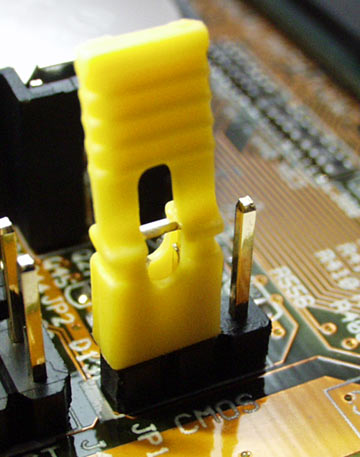 sort of thing on 2 pins, move it to the other 1 theres 3 pins in a row, it'll be set on 1 and 2, you need to put it on 2 and 3 then restart the comp then after about 30 seconds change it back and restart normally

 Reply With Quote



 Posting Permissions
- You may not post new threads
- You may not post replies
- You may not post attachments
- You may not edit your posts