



No software came with mine Windows manages mine.Originally Posted by entrance

Results 11 to 14 of 14
-
 Never argue with an idiot, he'll drag you down to his level, and beat you with experience.
And 15 mins later... Originally Posted by Recursion
Sapphire ATI Radeon HD 5850 1024MB GDDR5 PCI-Express Graphics Card £195.73 1 £195.73
*ordered.
-
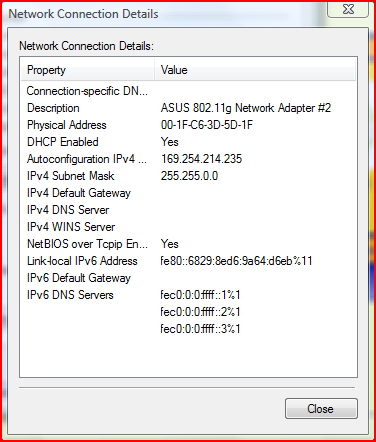
That's when it connects (If it ever does), that's the IP I get.Never argue with an idiot, he'll drag you down to his level, and beat you with experience.
And 15 mins later... Originally Posted by Recursion
Sapphire ATI Radeon HD 5850 1024MB GDDR5 PCI-Express Graphics Card £195.73 1 £195.73
*ordered.
-
28-01-2009, 03:41 AM #13

I would try this cause this worked for me:
Go to Run (Start, Click Run)
and type in this: C:\WINDOWS\system32\services.msc
Scroll down until you see Wireless Zero Configuration
Right Click and hit Properties.
Then see if it starts automatically, if it doesnt, just switch it to Automatic by using the drop box.
Click on the Recovery Tab
See what your settings are. Most of the time, it is good to set restart the program and run a program.
Now click on the Dependencies tab, see what it relies on for it to run.
Write down the names of them and then search for them.
One of the files in the services folder I just had you open.
Search for its dependicies and see which ones say they have a problem. If they dont then I really dont have any more help. You could try running a check on all the dependicies but thats just meUser: cazzzaDate: Mon Oct 26, 2009 @ 10:56 pmMessage: JB u will be remembered as a legend to everyone love you
-
All sorted. Bought a new one from play.com
 Never argue with an idiot, he'll drag you down to his level, and beat you with experience.
And 15 mins later... Originally Posted by Recursion
Sapphire ATI Radeon HD 5850 1024MB GDDR5 PCI-Express Graphics Card £195.73 1 £195.73
*ordered.

 Reply With Quote


 Posting Permissions
- You may not post new threads
- You may not post replies
- You may not post attachments
- You may not edit your posts