





So you say, Windows doesn't "just work"?
The GUI being beautiful is personal preferance, imo Aero is nicer. Spotlight isn't easier to find stuff? It's just the same, you type in a box and it looks for stuff, It doesn't load quicker?
Having it in the start menu is easier if you use keyboard shortcuts a lot, like I just press the windows key and start typing for something to find, easier than grabbing the mouse and clicking the box then typing.
PERSONALLY I don't like seeing whats currently open in the dock, because it doesn't have the program names there. Exposé I can't comment on as I haven't really used it.
View Poll Results: What do you use and which one do you prefer?
- Voters
- 51. You may not vote on this poll
-
Use Windows but prefer Mac
8 15.69% -
Use Mac but prefer Windows
0 0% -
Use Mac and prefer Mac
12 23.53% -
Use Windows and prefer Windows
29 56.86% -
Other
2 3.92%
Results 61 to 70 of 94
Thread: Mac vs Windows
-
 :8
:8 Originally Posted by Chippiewill

-
05-08-2008, 11:23 AM #62
- Join Date
- Dec 2006
- Location
- Nottingham
- Posts
- 7,752
- Tokens
- 756
- Habbo
- katie.pricejorda
Originally Posted by HotelUser
1) I think that very much depends on the hardware, I've never noticed it being slower than XP, it's either been faster or similar.
2) First of all, Vista to run smoothly does need to be a little above the recommend minimum (They recommend about 1GB Memory when 2GB Memory is usually more sufficient). I think you've had some bad experience's with it being loaded on low-spec machines or upgrading from XP. Very few XP machines are capable of running Vista well, and then you'll run into software problems with the upgrade anyway.
3) The Sidebar isn't the most useful object ever, it's not too bad but it can be easily removed...
4) UAC Control is nothing, it's not ever that annoying clicking 'Allow' whenever you do anything serious to your computer settings, at least you don't have a password like on Mac's. This can easily be turned off too. It's hardly a Vista woe.
5) I'm afraid my biggest problem with Vista is probably drivers, and by the looks of it you have problems with software. Incompatibility is not Microsoft's or Vista's fault, it's companies being too lazy and greedy to update drivers and software. Generally only software on older CD-Roms are trouble, most things off the internet are fine.
6) So what if you prefer the indexed searching on Mac? You haven't said what's wrong with it on Vista, searching is immense on Vista, it's very accurate and finds it as you type it. If you remember it used to take about 5 minutes on XP to search, I do hope at least you've installed indexed searching on your Windows XP as it's undeniabilty a bigger improvement.
7) Well if it's bundled on a computer I certainly wouldn't remove it as it's more likely to run it, it has many smaller features which improve things such as a stripped down Windows Movie Maker, the Snipping Tool, Windows Media Center is on most versions of Vista and it's hardly ever found on XP. Media Center makes watching through a TV Extender, Xbox 360 or TV Tuner much easier. Windows Mail is a lot easier to use than Outlook Express and the majority of programmes that come with Vista have been simplified and cleaned up. Windows Explorer is much easier to use and it's better organised and one of the better unknown features of Vista is the memory management and automatic defragging which makes a huge difference as with XP you had to manually defrag and that took ages, Vista does it every day with out telling me, at least it can make good use of the more memory.
-
Originally Posted by Tawm
- I probably can't say much about the "working" bit because I've been using mac for about 3 weeks ish. However, I find it to be much easier to work, like crashes quite often for me.
- Its easier in that you don't have to go through 2 menus to get to it, also, its more comprehensive, its searches the whole mac hd and groups it according to type
- I don't really use different windows of the same app so it works for me, there will be a little light below apps that are open in the dock, and a separate area for other apps open, its also easier to launch apps as I don't have to go to start menu etc., just right there. Buttons are larger too if you're comparing it to quick launch
- Expose is like Flip 3D except it shows all the windows and it doesn't lag so much.
- Also to add on: Faster startup/shut down times on mac
- Dashboard is better compared to sidebar - gets out of the way when I don't need it, little mouse shortcut and I can view it again, covers whole screen so I can throw in more widgets
shawn
-
1. Windows NEVER crashes for me?
2. 2 menus? You press the start button and BAM! its there... Windows searches EVERYTHING on the computer, wether is a Partition for Videos or a USB Stick.
3. But this relies on you knowing the icon for the particular app, or the developer even making an icon, which 99% do but still. You can just type an app into the search bar on the start menu and it will come up, just press the windows key, type, then press enter usually.
4. Flip 3D NEVER lags for me, and it does show all the windows...
5. Macs don't start up that quick actually, they are quite slow in comparison to quite a few Windows Vista systems.
6. Dashboard is awfull, but sidebar isn't that much better. But the sidebar, can actually be made into a full screen thing, you just drag the gadgets over to where you want them on the desktop and then close the sidebar and bam! its done. But i never use the sidebar, or dashboard if I had a Mac, anyway.:8 Originally Posted by Chippiewill
-
I'm not arguing the case for Mac, XP > Vista > OS X Originally Posted by Tawm
Just because it can be turned off doesn't mean it isn't a point against it, the paperclip in word for example, the vista welcome screen, apple trying to install safari on your computer when you have itunes or quicktime. Originally Posted by Tawm
Originally Posted by Tawm

That's your opinion, I had Vista installed on my machine for about 10 days when SP1 came out and it was nearly always using ~40% of my CPU on idle whereas XP is currently using 12% while playing a video on my second monitor and editing the picture I'm doing for number 3 in fireworks. Originally Posted by Tawm
Vista is overoverpriced. I wouldn't pay half of what they're charging for it (plus I could get XP for that much Originally Posted by Tawm
 ).
).
Last edited by DrLacero; 05-08-2008 at 11:57 AM.


-
If the resources are there, why not use them? It frees them up when they are needed.
Screenshot:
If the buttons were any smaller, then they would be damn hard to click.
Again, Aero is personal preference, I like the eye candy and the transparency, which again can actually be turned off.
The sidebar comment could be said the same for dashboard.
The power buttons are actually in quite an easy access spot and I like them there, but again personal preference.
You need Vista installed for about a Week - Fortnight for it to fully optimize it self for your system.:8 Originally Posted by Chippiewill
-
The heated debate continues Originally Posted by Tawm

2. The Mac Spotlight is much neater imo, you can search for more things e.g. folders, documents, everything with that name, while windows only do apps.
3. Most of them have icons, and the icons are quite easy to remember
4. Maybe I have a slower PC
5. Really? Because when I first got my Vista (nothing inside it) it still took quite some time to start, shorter than my XP (dunno really because my XP is a slower machine). Mac is like 10 secs start 3 secs shutdown
6. I love dashboard. Dragging the widgets on the desktop for Sidebar is very messy. I love the idea that with the click of a button you reveal a so-called "parallel workspace" where you can access it quicker. On windows, you need to minimize the windows first, showing desktop (alt+tab) does not show the sidebar, it just shows the desktop
Rebut away
Btw, no offense, but if you haven't use a mac, you won't know how it feels. I've used both before so I can gauge. No offense once again shawn
shawn
-
get a bigger screen Originally Posted by DrLacero
-
Interesting to note, Vista is much more expensive than OS X. Theres only 1 version of Mac OS X and I assume they'll make it their best. I remembered when I bought my OEM Vista Premium, it was at the cost of OS X. Ultimate at that time costs SGD$600 ish. Originally Posted by Tawm
shawn
-
It didn't seem to when I ran a game :S Other than DX10 (which you can get on XP by the way) it didn't offer me a better gaming experience. Originally Posted by Tawm
This is perfection Originally Posted by Tawm
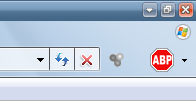
Vista is waaaay too big
It's not about where they are, they were always there. What's wrong with this? Why have a Power, Log off and a menu containing those 2 again when you can have this one button which can do them all? Originally Posted by Tawm
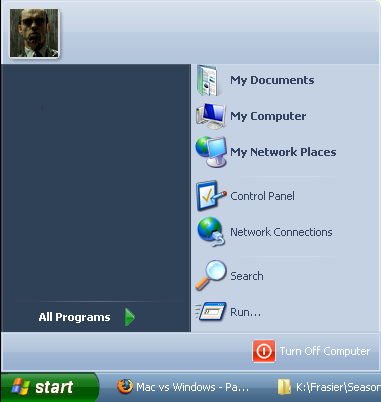
I could barely stand it after a few hours, I put up with it so I could see if it got any better or easier to use and after 10 days it didn't, an OS shouldn't have to take time to work better on your system, if it isn't ready to use and doesn't give you the option to configure it yourself like Linux then it's pointless. Originally Posted by Tawm
Probably, I never used it when I've used OS X. Again I'm not pro OS X, I don't like Vista or OS X Originally Posted by Tawm
That's the default screenshot that someone else took, I use 1280x1024 and couldn't find a screenshot in that resolution. Originally Posted by Stephen
Last edited by DrLacero; 05-08-2008 at 12:12 PM.

 Reply With Quote


 Posting Permissions
- You may not post new threads
- You may not post replies
- You may not post attachments
- You may not edit your posts