
Originally Posted by Adam!

LOLLLLLLLLLLLLLLLLLLLLLLLLLLLLLLLLLLLLLLLLLLLLL
THat better then a joystick tbh!
Results 9,641 to 9,650 of 19205
-
02-01-2008, 12:19 PM #9641WarezKid Guest

-
Found it just after I posted lol.
Doing myfirst flight tomorrow as I'm controlling tonight so I'm studying. VR|46
VR|46
-
FS2004 Sound Stutters +REP! (Dont have to have fs to help me!) DXDiag problem!
I've had this problem since I had the laptop, never thought anything of it, but then I stumbled across this thread:
http://www.flightsimworld.com/forums/index...showtopic=28865
P.s. i'm on vista
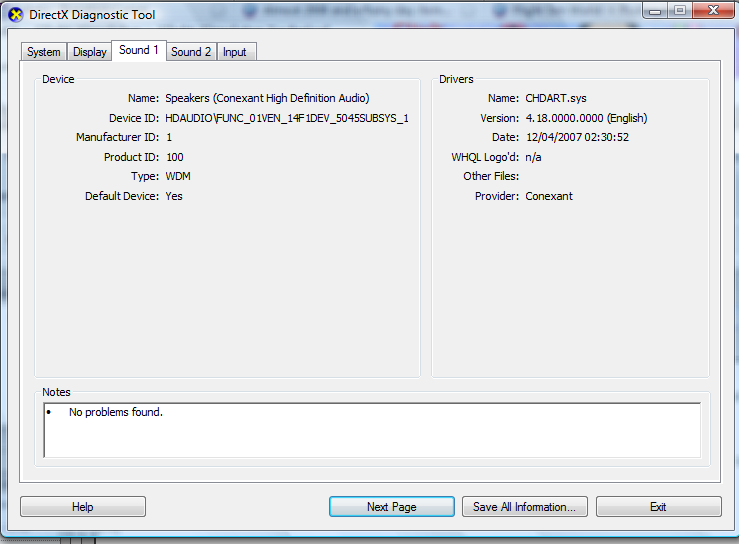
So, I tried that and my DXDiag is displayed as this:Q) HOW CAN I STOP SOUND STUTTERS IN FS2004
A) CLICK ON START AND THEN RUN. TYPE IN "DXDIAG". LOOK FOR THE SOUND PAGE, THEN NOTE POSITION OF SLIDER FOR SOUND ACCELERATION. MOVE IT FROM HIGH TO BASIC.
So, how would I do as the thread says, or is there another way?
Thanks!!
P.s. Sorry if it's the wrong place
drink up this bottle of yeah
and P A I N T your body on me
-
Try next page or sound 2.
VR|46
-
Start » Control Panel » Sound » Sound & Audio Devices Properties » Speaker Settings » Advanced » Switch the bottom needle to the middle.
Other Options :
Restart Your Computer » Start » Run » DXDiag » If you get a message press yes » Sound » Direct X Features » Harware & Sound acceleration level » Set that to basic.
If not you may need to reinstall your audio drivers.
Failing that, top + bottom are two different methods, You'll need to try work the top one out for Vista as im not on my own vista system atm.CPU i5 3570 @ 4.2 GHz | Mobo GigaByte Z77D3H | RAM 8GB | GPU AMD Radeon 6870 | OS Win 8 64-bit | HD 1TB HD and 128GB SSD | Wheel Logitech G27
-
02-01-2008, 03:25 PM #9646
 Nothing there, Looked it at myself. Originally Posted by DJ-Simpson

Previous Habbox Roles
Co-Owner of Habbox | General Manager | Assistant General Manager (Staff) | Forum Manager | Super Moderator | Forum Moderator
-
02-01-2008, 03:27 PM #9647WarezKid Guest
They different drivers that why lol.
-
Try G-BOAH's ideas if they don't work I'll have a look but I dont run on Vista.
VR|46
-
None of them helped,
 Thanks though.
drink up this bottle of yeah
and P A I N T your body on me
-
02-01-2008, 03:30 PM #9650
I hope you posted your problem over at FSW. Originally Posted by SyrupyMonkey
Previous Habbox Roles
Co-Owner of Habbox | General Manager | Assistant General Manager (Staff) | Forum Manager | Super Moderator | Forum Moderator


 Reply With Quote







 Posting Permissions
- You may not post new threads
- You may not post replies
- You may not post attachments
- You may not edit your posts