






I don't really mind spoilers. They just make me want the game even more.
I actually can't wait to play as Lucario. I hope Mewtwo is back aswell though, He's my favourite pokemon.
Also, so far it seems Mario teams up with Link, Samus teams up with Pikachu, Ness teams up with Lucas and Marth teams up with Metaknight. Although you may be able to pick. It looks like every character will have an evil version of themself aswell.
Results 701 to 710 of 852
Thread: The SSBB update thread.
-

Last edited by Neversoft; 29-01-2008 at 05:35 PM.
-
-
Whe- where- SONIC?!?!?!?
 Originally Posted by PaulMacC


Click the image.
-
It was confirmed a while ago, i think at Jump Festa, that Sonic and Snake were unlockables Originally Posted by Death Note
---

Originally Posted by Jackie Jack™
-
Stop stealing my pictures. Originally Posted by PaulMacC

I am legend. Originally Posted by PaulMacC
I like Mewtwo better than Lucario pokemon wise, but I'm not that good with Mewtwo in Melee. So if Mewtwo is also in Brawl, I'll probably like Lucario better.
-
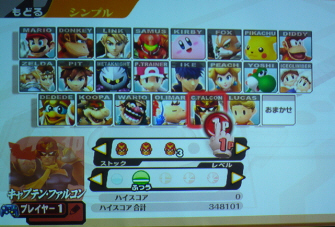
The roster is released!
Brawl is what some might call the standard mode for the Smash series. There’s quite a bit to do on the character-selection screen, so I’d like to give you a quick rundown of what you can expect to find there!
There’s no need to memorise all this, though. Uh-uh.
 Behold, the character-selection screen!Choosing a CharacterMove your little hand-shaped cursor around the screen and drop your token on a space of your choosing to select a character.
 First you grab it, then you place it down.Changing Your Character’s ColoursTap your selected character to change his or her outfit.
 Now that’s styling!On this screen, you can also select which character you start a match with when playing as Pokémon Trainer or Zelda/Sheik.
 Just give the character of your choice a tap and you’re good to go.For those times when you don’t care who you play, you can let the game decide by placing your token on the Random space. This time, unlike in Melee, you won’t know who you’re going to play as until the match starts.
 Today I feel like playing as Random.Name EntryTap on the area marked with a pencil icon below a player’s selected character to select and enter a name for that player.
 You can also register new names right from the character-selection screen.Fighting Computer-Controlled (CPU) PlayersTap on the area marked with a player’s number (i.e. Player 1) or name to exclude that player from the fight or to switch that fighter over to a computer-controlled player.
 All panels for CPU characters are grey!You can adjust the difficulty of CPU players by tapping on the area where you’d normally tap to select player names.
 This time around, raising the difficulty level for CPU players will put you up against some pretty fierce competition.Changing the RulesAccess the rules menu by tapping on the area with "2-minute KO fest!" written into it.
 Tap right here.
 Switch the rules to a Stock match and it looks like this.
 And here’s where you can adjust item settings.
 You can adjust the match length for Time brawls from here as well.Setting a HandicapIf you turn on Handicaps in the rules area, you can set them from the character-selection screen.
 This ought to make things a bit more thrilling.Team BrawlTap on the area marked Brawl in the upper-left portion of the screen to switch play to Team Battle. The most common form of Team Battle is 2 on 2.
 This text...
 ...changes to this.
 Tap on the flag in the upper-left area of the box to change your team assignment.When everyone has finished making their selections, those famous words "READY TO FIGHT!" will appear on screen. Once you see those words, press the button on your controller that functions as "Start" or tap the words themselves to move to the stage-selection screen.
 Here’s that stage-selection screen.I’m sure you see that icon marked Melee Stages down at the bottom of the screen, don’t you? Tap here to access several Melee stages for your playing pleasure.
 I couldn’t quite get every stage into Brawl...But there’s more! There’s a switch at the bottom here marked Custom Stages. Tap on this to access the custom stages you made in the Stage Builder.
So many situations are possible when you try combining various configurations of characters, stages, items and individual rule settings. I’m hoping you make full use of these choices and have a lot of fun.
If you +rep me, you'll be pretty like... Leeyuh
If you -rep me, you smell like...Wootzeh
Currently: 391 (209 to go)
Visit my forum [NOW UPDATED]
Ex-Head DJ Mikey
-
Old news +rep Originally Posted by KnuxIBF
Every update shall be boring now
(Unless it's the release date!)
Click the image.
-
-
Official roster, all characters unlocked.

Videos
Video with pictures from the game 1
Video with pictures from the game 2
Marth, Metaknight and Ike (SSE)
Metaknight vs Link (Battle)
Marth and Metaknight (SSE)
Marth and Metaknight - Breakthrough
New Brawl Match with 4 Players
New Brawl Wifi Footage
Iceclimbers and Assist Trophies.
Lucas vs Pokemon Trainer
Toon Link vs Ganondorf
Wario vs. Snake vs. Olimar & Pikmin vs. Link on custom stage
Sonic Vs. Snake Vs. Ness Vs. Ike on the Summit level.
Snake vs. Sonic vs. Dedede vs. MetaKnight on Shadow Moses
Pokemon Trainer vs Captain Falcon at the F-Zero Stage
Boss Fight of Pokemon Trainer vs Master Hand!
SSBB Kid Icarus SSE
Wi-Fi Ike,Ness,Diddy and Pit
SSBB Fox SSE Boss
SSBB Kirby SEE Boss
Wifi: Mario vs Pokemon Trainer vs Dedede vs Diddy
Mario and Pit SSE Stage
SSBB Diddy Kong SEE
Giant R.O.B. Event on Ice Climber Stage
Ike vs Toon Link vs Mario vs Peach
Luigi's Mansion Stage
Stage Creator
Homerun Contest
Starfox and Pikmin Stage
More Wifi Gameplay
Coin Shooting Mode
Earthbound Stage
100 Man Brawl
Earthbound Boss Final
Retro Demo Super Metroid
Sticker Mode
Dioarama Mode
Pictochat Stage Fight
Wolf Gameplay: http://www.youtube.com/watch?v=0H6uRcUADi8
-
Hey guys... if you don't mind - could you please keep spoilers in here:
http://habboxforum.com/showthread.ph...63#post4404263
Thanks!


 Reply With Quote






 idk i like it but idk omg idk.....




 Posting Permissions
- You may not post new threads
- You may not post replies
- You may not post attachments
- You may not edit your posts