


sorry for double post i cliked back and edit had gone!
but anyway
I had another go at the payphone trying to make it more habbo-ish my brther helped me a little bit this time here it is

Results 11 to 20 of 27
Thread: My first alt (pay phone)
-

-
ok i will post it in a bit
 , lemme eat brekkie first! haha

-
that ones a bit better , well done
 Originally Posted by Twigster
Weasel Rob - Lvl 91
Originally Posted by Twigster
Weasel Rob - Lvl 91
-
its wonky lollol
edit : oh dat new ones betterLast edited by Ree...; 24-07-2006 at 11:11 AM.
-
Not bad for a first alt, but working on a Habbo alt requires isometric shapes.
http://www.gihabbo.co.uk/index.php?gi=qalts
That might help you a bit, but you don't need alot of help because you have the basic idea on making them!
8/10 if it wasn't ment to be Habbo-ish
5/10 if it is ment to be Habbo-ish.LEFT
FOM & FOW
If you need me, feel free to PM me here for contact details.
-
-
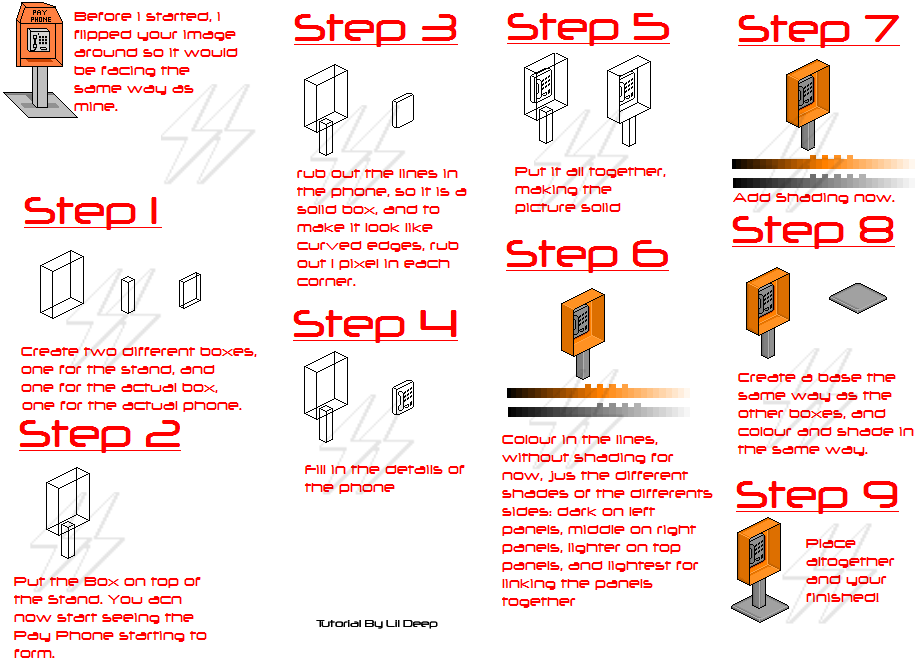
Here you go, this tuorial is a quick tut. and is very basic.
If you are just starting to do alts, it is always best to start using basic shapes, not fancy one you have chosen lol, i must admit my shading is awful in this, so do not copy my style lol, i have left out a lot of shading because this was quick and basic.
-
lildeep , you should post that in tutorials
good guide
Last edited by Robzor; 24-07-2006 at 12:45 PM.
Weasel Rob - Lvl 91
-
oh thanx, hahaha i just realised on step 1 i messed up, i meant to put "three different boxes", but i accidently put "two" lol o well you all understand!
Last edited by lildeep; 24-07-2006 at 12:54 PM.
-
what program did u use lildeep ?
Weasel Rob - Lvl 91

 Reply With Quote







 Posting Permissions
- You may not post new threads
- You may not post replies
- You may not post attachments
- You may not edit your posts