


Displaying Time and Date through JavaScript
A Tutorial By Matthew License AKA Sketti
I'm gonna start off by guessing you all know how to start off JavaScript - with <script language="JavaScript"></script> for all you people who don't know.
Date
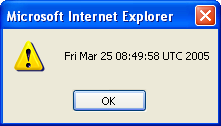
Well inside the <script> tags for the basic date in an alert put this:
That will give you:Code:<script language="JavaScript"> var now = new Date(); alert( now ); </script>
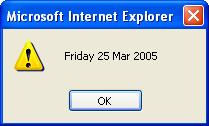
Now of course not everyone wants that do they? So that's when it get's an awful lot more complicated.
And that will give you this:Code:<script language="JavaScript"> var days = new Array("Sunday", "Monday", "Tuesday", "Wednesday", "Thursday", "Friday", "Saturday"); var mons = new Array("January", "February", "March", "April", "May", "June", "July", "August", "September", "October", "November", "December"); var now=new Date(); var yy = now.getYear(); varmm = now.getMonth(); mm=mons[mm]; var dd = now.getDate(); var dy = now.getDay(); day=days[dy]; alert(dy+" "+dd+" "+mm+" "+yy); </script>
Time
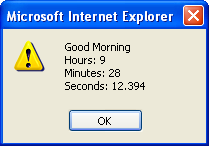
If you want a basic (I say basic but it's rather hard!) time information alert you'll want this:
That will give you this:Code:<script language="JavaScript"> var now = new Date(); var hh = now.getHours(); var mn = now.getMinutes(); var ss = now.getSeconds(); var ms = now.getMilliseconds(); var hi = "Good Morning"; if( hh > 11 ) hi= "Good Afternoon"; if( hh > 17 ) hi= "Good Evening"; var tim = hi + "\n"; tim += "Hours: " +hh+ "\n"; tim += "Minutes: " +mn+ "\n"; tim += "Seconds: " +ss+ "." +ms; alert(tim); </script>
JavaScript Clock
The script below displays the time according to your computer in an HTML form text input.
That code will give you this (with the current time):Code:<body onLoad="tick()"> <script language="JavaScript"> <!-- function tick(){ var now = new Date(); var hh = now.getHours(); if( hh <= 9 ) hh = "0" + hh; var mn = now.getMinutes(); if( mn<= 9 ) mn = "0" + mn; var ss = now.getSeconds(); if( ss <= 9 ) ss = "0" + mn; var tt = hh + ": " +mn+ ": " + ss; document.f.clock.value = tt; window.setTimeout( "tick()", 1000 ); } // --> </script> <form name="f"> <input name="clock" type="text" size="10"> </form> </body>
I Hope This is of some use to you. Remember! JavaScript is case sensitive so be very careful. Also try not to delete any of the brackets or semi-colons or the scripts won't work.
Results 1 to 10 of 15
-
 Displaying Time and Date through JavaScript
Last edited by Sketti; 25-03-2005 at 09:58 AM. Reason: Spelling Mistook
Join My Forum
-
Dont put them in alerts its just irritating :S

Chilimagik.net // Reviews, Band Biographies, News, Pics + Loads More!!
[Thybag.co.uk - Vive la revolutione]
-
I put the alerts in so you could see what they look like. And if your on about in the script how else are you gonna tell the time without the clock script at the bottom?
Join My Forum
-
That's great ! 10/10 Should be pinned !.
Maybe add the script so it's a popup, like the alert, but so it comes up as an altert. Unless that's what you've done :s/
I can't do javascript
-
It took me a while to learn the basics but once you find a book that helps teach you you're off.
Join My Forum
-
Nice work...
I shall refrain from posting the URL, where you can get all that information because you get al up tight about it and think I am critising your work..
Well done
-
-
Its not as much the box just the noise it makes :| and also it lags my comp but then my comp has a mind of its own!
Chilimagik.net // Reviews, Band Biographies, News, Pics + Loads More!!
[Thybag.co.uk - Vive la revolutione]
-
i just dont like them in general
Last edited by -JT-; 25-03-2005 at 03:14 PM.
-


 Reply With Quote





 Posting Permissions
- You may not post new threads
- You may not post replies
- You may not post attachments
- You may not edit your posts