


ryt so im getting this tv for my bedroom soon
http://www.currys.co.uk/martprd/stor...&category_oid=
and it says
- Inputs - 3xHDMI, 2xSCART, 1x Component,1xPC
so what do i need to connect my pc wiv ma tv?
Results 1 to 6 of 6
Thread: ryt so help
-
 ryt so help
i dont give a ____ if i do its ____ you
ryt so help
i dont give a ____ if i do its ____ you
fyi, i wont stop using adblock #shame.
crazycolaist/leerm
oh and if you moan that im rude its because
i dont have respect for most 15 year olds...
especially ones which come on here.
-
A VGA cable like what connects most monitors to PCs.

If you want sound to go through the TV you'll need a cable like this also. 3.5mm to 3.5mm, but you could jusat run the sound through your PC/speakers.

-
17-07-2008, 08:06 PM #3

I use the same as N!ck showed his first image and just join my monitor or sumt to my tv, i dunno now lol.
-
17-07-2008, 08:44 PM #4
- Join Date
- Dec 2006
- Location
- Nottingham
- Posts
- 7,752
- Tokens
- 756
- Habbo
- katie.pricejorda
It's a TV not a monitor so I'm guessing he'd use a DVI Cable as it's digital? Originally Posted by N!ck

See if your computer or graphics card has a slot like this, it's usually white:

If so you just need a DVI Cable:

If not you'll probably need a VGA to DVI Cable:
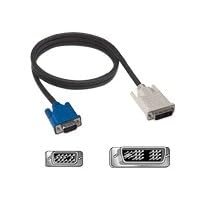
-
Most TVs take a VGa input and some can take both DVI and VGA, but i don't think there's any with just DVI. Originally Posted by Jordy
-
yeah i got that dvi slot at the back 2 of them
i dont give a ____ if i do its ____ you
fyi, i wont stop using adblock #shame.
crazycolaist/leerm
oh and if you moan that im rude its because
i dont have respect for most 15 year olds...
especially ones which come on here.

 Reply With Quote





 Posting Permissions
- You may not post new threads
- You may not post replies
- You may not post attachments
- You may not edit your posts