


Hey,
I downloaded a .zip file. When I try extracting it, it says "No files could be extracted"
Why?! It's a file with like 11 MB..
Results 1 to 10 of 11
Thread: Problems extracting .zip files.
-
 Problems extracting .zip files.
-
Did it successfully complete downloading? It sounds as though the file is corrupt to me.
This is our situation and we're happy to be here,
I wouldn't change this place for anything.
-
Yes it did.
-
Try re-downloading?
-
Tried 10000 times
-
erm memory? depends have u tried extracting to different drives?
I don't accept pm's, instead leave a message on my profile aka vistor message thing.
Rep means nothing to me, thats why I even say I dislike +reps.
Cool List: Mario, dinasaw, buttons, Drlacero, flyingjesus,hitman paulmaac,jesus (forum name),today, hitman and last but not least beautiful. 8),
8),
if I forgot you sign my visitor page.
-
Are you using winrar? I have had this problem, but it usually is fixed by re-downloading the file. Also, when downloading zip or rar archives, try to save them instead of opening them straight away.
-
If you are not using winrar get it from rarlabs.com
 Originally Posted by Stephen

should work


-
it works. But if it's a .zip file, i just right-click it and extract.
But if it's a .rar file, i use WinRAR
-
WinRar is better than the built in zipper by a long long way, set WinRar as the default for all archives then you'll have these options for it: Originally Posted by Meti
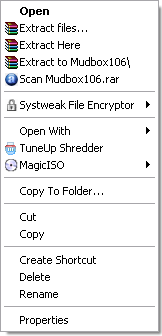
(Obviously you won't have the non-WinRar ones unless you have the same programs as me but that goes without saying)


 Reply With Quote


 Posting Permissions
- You may not post new threads
- You may not post replies
- You may not post attachments
- You may not edit your posts