



PHP Pagination Tutorial (from a MySQL database) - By L?KE
[1][What is it?]
It is recommended that you have a basic knowledge of PHP to understand what everything does.
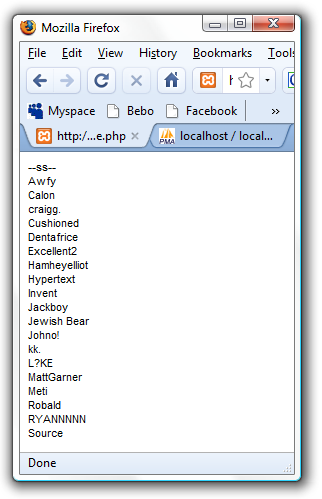
First of all, what is pagination? When using PHP to dynamically display items from a database, we often find that when the database becomes bigger, displaying everything one page is silly. What do we do? We limit the amount shown per 'page'. You may have seen this being implemented on many sites, it is even used on this forum. It is inredibly easy to implement and to style, so go wild
Example:
[2][The Code]
Just so you know, this is a rather large script, so I will show it fully, then explain the 'chunks' down below.
Also, the data I've used is people I've seen around the D&D forum, so feel privelaged
Let's pull that apart and explain...
[3][Database Connection and Variables]
The 'You should replace this', depending on the scale of your site can either be changed to the details that suit your database and host, or replaced with an include to a 'config' file.PHP Code:/*******************************************/
/** You should replace this ****************/
/*******************************************/
mysql_connect("localhost","root","");
mysql_select_db("pagination_tut");
$table = "example";
/*******************************************/
$prows = 3;
$spread = 2;
$page = $_GET['p'];
$query = mysql_query("SELECT * FROM $table ORDER BY `value` ASC");
$rows = mysql_num_rows($query);
$lastp = ceil( $rows / $prows );
$prows = 3; - This is assigning the amount of rows we want per 'page' to a variable, '$prows'. This can be changed to whatever you like.
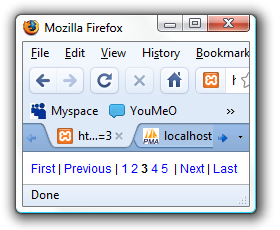
$spread = 2; - This is assigned the spread of the page numbers we want. In this instance the spread is 2 so the page numbers will include those plus and minus 2 either side of the current page. Like so:
Notice how the current page in bold has two either side of it, as specified with '$spread'
Then we grab the current page 'p', with the $_GET variable. If there is no page specified, we will deal with it later on.
The penultimate part of this section is to count the amount of rows in the database, using a simple query.
Then finally we divide the total amount of rows by the amount we would like per page. To avoid not getting a whole number we used ceil() to round up. This gives us our last page.
[4][Making sure nobody has cheated]
The first if statement checks if the 'p' variable is set (which it wouldn't be upon first visit to the page), and so gives it the value '1'.PHP Code:if(!isset($page))
{
$page = 1;
}
if($page < 1)
{
$page = 1;
}
if($page > $lastp)
{
$page = $lastp;
}
The second determines that the page number is greater than 0 (or not less than one), and gives it a value of '1'.
The third and final checks that the current page is not bigger than the last possible page and if it is, it makes it equal to the last page.
[5][Displaying Appropriate Data]
We determine the start row of this page by taking the previous page number ($page - 1) and multiplying by the amount of rows per page ($pn * $prows).PHP Code:$pn = $page - 1;
$pn = $pn * $prows;
$q = mysql_query("SELECT * FROM $table ORDER BY `value` ASC LIMIT $pn, $prows");
while($f = mysql_fetch_array($q))
{
echo($f['value']."<br />");
}
echo("<br />");
Using a new query we are then able to select the data we want, from its starting point for as many rows as specified. Then the while statement displays each value appropriately as I specify. This part is what you would change in order to create a more attractive looking set of data per page.
echo("<br />"); is not necessary, it was just so in my example I could seperate the data from the page numbers.
[6][Displaying the 'First' link]
Using an if statement we see if the page is 1 or not - if it is we echo the First text but not as a link, because they are already on the first page. If it isn't we echo the First text as a link specifying p as 1. 'example.php' should be changed appropriately.PHP Code:if($page == 1)
{
echo("First | ");
}
else
{
echo("<a href='example.php?p=1'>First</a> | ");
}
[7][Displaying the 'Previous' link]
Again, using an if statement we check if the page is bigger than 1. If it is, then you can display the Previous text as a link and specify the p (page number) as the current page minus one. However, if it is not bigger than 1, we just give it as text.PHP Code:if($page > 1)
{
$prev = $page - 1;
echo("<a href='example.php?p=$prev'>Previous</a> | ");
}
else
{
echo("Previous | ");
}
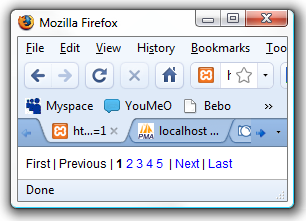
Here you can see the links displayed as text, as opposed to links, because we're on page one:
[8][Minimum and Maximum]
Bit of logic here. I'm not sure if this is how most people manage the spread of pages, or if it is the shortest way of doing but this is the way I used and seems to work for mePHP Code:$min = $page - $spread;
$max = $page + $spread;
if($min < 1)
{
$dif = 1 - $min;
$min = 1;
$max = $max + $dif;
}
if($max > $lastp)
{
$dif = $lastp - $max;
$max = $lastp;
$min = $min + $dif;
}
if($min < 1)
{
$min = 1;
}
First off, we work out the minimum and maximum page number to display by taking the current page and taking away/adding the spread number. But what happens if the minimum is less than one or the maximum is more than the last page? Read on..
If the minimum is less that one, we work out the difference and add that on to the maximum so there is always the same amount of pages shown. Then we make the minimum 1.
If the maximum is bigger than the last page number, again we work out the difference and add it to the minimum. Then we make the maximum the last page.
I'm not sure if there's a quicker way of doing this, but that's just how my brain works.
See how the current page is bold, and the rest are links:
[9][Displaying the appropriate pages]
Using a for statement we display each page number within our minimum and maximum range. During the if statement we check if the number is the current page, and if it is we give it as bold to show the user which page they're on. If not, it's just a regular link, with p set as the number.PHP Code:for($i=$min;$i<=$max;$i++) {
if($i == $page)
{
echo("<b>$i</b> ");
}
else
{
echo("<a href='example.php?p=$i'>$i</a> ");
}
}
[10][Displaying the 'Next' link]
Using an if statement we check that the current page is less than the last page, and displaying a link to the next page if this is true (because if you're on the last page you can't go to the 'next' one can you?). Same as before, if this is false we display just plain text.PHP Code:if($page < $lastp)
{
$next = $page + 1;
echo(" | <a href='example.php?p=$next'>Next</a>");
}
else
{
echo(" | Next");
}
[11][Displaying the 'Last' link]
Same as displaying the 'First' link, we check if the current page is the last page. If it is we echo text, if not we give a link, with p being specified as $lastp (the last page :rolleyesPHP Code:if($page == $lastp)
{
echo(" | Last");
}
else
{
echo(" | <a href='example.php?p=$lastp'>Last</a>");
}
.
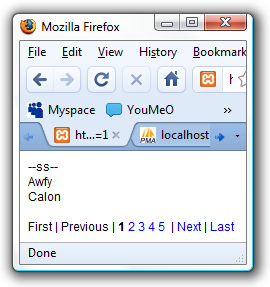
As with the 'First' and 'Previous', see how the last two links are text, as we're on the last page:
[12][Stuff]
I guess that's it. I hope I helped and my explanations made sense to you.
Oh, and if you find any errors please PM me.
Happy Paginating
Moved by Meti (Forum Moderator) to Webdesign Tutorials: Great Tutorial!
Results 1 to 10 of 12
Thread: [TUT] PHP Pagination
-
 [TUT] PHP Pagination
Last edited by Meti; 16-11-2008 at 08:25 PM.
-
Nice tutorial =]
Thanks im sure it will help many people =]
+rep if i canBack for a while
-
Looks like you have spent a fair bit of time on that tutorial

Nice one.
Im sure people learning PHP will appreciate it.
+rep if i can...
-
Heh, thanks guys
-
o hells yeah, i'm on the list. Makes it worth it
Nice tutorial, I'll have a better look once I finished this homework but +rep if I can
-
Of course you're on the list..
-
Great Tutorial Luke!
You really deserve +REP.. If I can =)
I'll add you in signature if I can't.
-
Why do your tutorials get moved instantly?
Nice tutorial, it will help a few people.. Good work, nice too see you're contributing something useful to the community. I'll try to +REP you for your effort.
-
Thankyou very much
-
I'm turning this into a class so that it is more versatile and can be used in more situations without the C+P.
How could this hapen to meeeeeeeeeeeeeee? lol.
lol.


 Reply With Quote





 Posting Permissions
- You may not post new threads
- You may not post replies
- You may not post attachments
- You may not edit your posts