Discover Habbo's history
Treat yourself with a Secret Santa gift.... of a random Wiki page for you to start exploring Habbo's history!
Happy holidays!
Celebrate with us at Habbox on the hotel, on our Forum and right here!
Join Habbox!
One of us! One of us! Click here to see the roles you could take as part of the Habbox community!


Page 1 of 2 12 LastLast
Results 1 to 10 of 11
  1. #1
    Join Date
    Aug 2006
    Posts
    15,252
    Tokens
    347

    Latest Awards:

    Default Everything is bigger.

    Most fonts on websites are now bold, my start menu is bigger, my icons in the bottom right are bigger and you cant even tell what they are.
    How do I fix this.
    No longer active on here


  2. #2
    Join Date
    Oct 2004
    Posts
    10,922
    Tokens
    0

    Latest Awards:

    Default

    Desktop > Right Click > Properties > Screen Settings and then change the resolution.

    I dunno

  3. #3
    Join Date
    Aug 2006
    Posts
    15,252
    Tokens
    347

    Latest Awards:

    Default

    Nah it's on the highest.
    No longer active on here


  4. #4
    Join Date
    Oct 2006
    Location
    West Midlands
    Posts
    463
    Tokens
    2,175

    Latest Awards:

    Default

    Can you post a screenshot? Also what OS are you on?
    Always lurking around, never really post.

  5. #5
    Join Date
    Jul 2006
    Location
    Leeds
    Posts
    17,006
    Tokens
    26,134
    Habbo
    e5

    Latest Awards:

    Default

    press ctrl and -

  6. #6
    Join Date
    Oct 2006
    Location
    West Midlands
    Posts
    463
    Tokens
    2,175

    Latest Awards:

    Default

    Quote Originally Posted by astonvilla View Post
    press ctrl and -
    I was thinking that but if it's his start menu too... So yeah,
    you might have changed the sizes on your display properties.
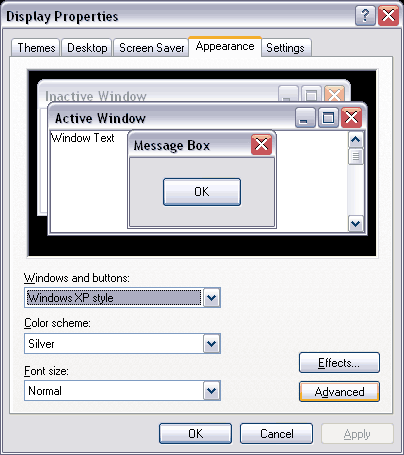


    On the Font Size drop down select normal.


    I think this might work?
    Always lurking around, never really post.

  7. #7
    Join Date
    Aug 2006
    Posts
    15,252
    Tokens
    347

    Latest Awards:

    Default

    Quote Originally Posted by Nli. View Post
    I was thinking that but if it's his start menu too... So yeah,
    you might have changed the sizes on your display properties.


    On the Font Size drop down select normal.


    I think this might work?
    The start bar and stuff is massive compared how it used to be. Nli I used that and it made some things smaller thanks but Im looking on how to make tabs on IE, Chrome and font on applications + the taskbar and stuff smaller.
    Here is some examples.
    No longer active on here


  8. #8
    Join Date
    Apr 2006
    Location
    UK
    Posts
    2,308
    Tokens
    0

    Latest Awards:

    Default

    i think its do to with start > accessories > accesibility
    jen&hev4eva

  9. #9
    Join Date
    Aug 2006
    Posts
    15,252
    Tokens
    347

    Latest Awards:

    Default

    Fixed it, it was in screen resolution > advanced and then I had to change DPI to normal.
    No longer active on here


  10. #10
    Join Date
    Jul 2006
    Location
    Leeds
    Posts
    17,006
    Tokens
    26,134
    Habbo
    e5

    Latest Awards:

    Default

    k wel its sorted now
    nice 1

    It's weird when it happens randomly like that lol

Page 1 of 2 12 LastLast

Posting Permissions

  • You may not post new threads
  • You may not post replies
  • You may not post attachments
  • You may not edit your posts
  •