


Hey Guys,
Recently finished setting up my Mac Mini, theres just one problem. I recently changed the password to what I thought was the password I use on my PC and it says the password is wrong. I've tried everything even leaving it blank.
I just installed Leopard and I surely don't want to have to REINSTALL leopard to fix a password issue. Is there anyway that I can get around this?
I need it to install UPDATES and make changes.
Results 1 to 5 of 5
Thread: [HELP] Mac Leopard Help!
-
 [HELP] Mac Leopard Help!
-
I'm pretty sure you have to re-install Leopard again.
-
If it is only new you can try calling apple care or take it down to a apple store as i am sure they mite know how to fix something like that as if you can not remember the pass the only why mite to to reinstall but apple mite have some disk or something to take it off.
-
http://support.apple.com/kb/HT1274Resetting the original administrator account password
Follow these steps to reset a password when there is only one administrator account on the computer, or if the original administrator account needs a password reset. "Original" administrator account refers to the one that was created immediately after installing Mac OS X. If the original administrator password is known, that administrator account may be used to reset the passwords of other administrator accounts using the steps described above.
- Start up from a Mac OS X Install disc (one whose version is closest to the version of Mac OS X installed). Usually, you can start from the disc by putting it in your computer, restarting, and holding the C key. Or, put it in the computer and click the Install or Restore icon you see in the disc's main window (after which the computer will start from the disc without you needing to hold C). Or, you can use Startup Manager.
- Choose Reset Password from the Installer menu (or Utilities menu in Mac OS X 10.4 Tiger). Tip: If you don't see this menu or menu choice, you're probably not started from the CD yet.
Note: The default keyboard layout is U.S. English while started from the installation disc. If you use a keyboard layout other than U.S English, use the Input menu (the flag icon on the right side of the menu bar) to select the desired layout before typing a new password.
- Select your Mac OS X hard disk volume.
- Select the user name of your original administrator account.
Important: Do not select "System Administrator (root)". This is actually the root user. You should not confuse it with a normal administrator account.
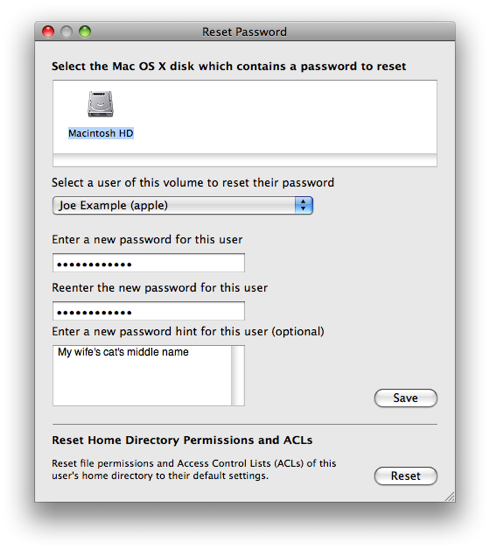
- Enter a new password.
- Click Save.
-
Plus rep
 Originally Posted by Johno!


 Reply With Quote





 Posting Permissions
- You may not post new threads
- You may not post replies
- You may not post attachments
- You may not edit your posts