


Hey all again, built my new pc this morning and everything's perfect; except the sound. The motherboard is an ASUS P5QL-EPU with 6channel audio etc. I've installed the drivers, made sure in BIOS sound was enabled etc, and on control panel it also says that the device is installed etc.
The problem is, I hear nothing. My speakers are plugged in and turned on as always, no matter what colour jack I use, no sound.
Any suggestions?
Results 1 to 6 of 6
Thread: Sound issue
-
11-09-2009, 01:06 PM #1

- Join Date
- Oct 2005
- Location
- Corby
- Posts
- 5,515
- Tokens
- 2,926
- Habbo
- cabbage (origins)
 Sound issue
no
Sound issue
no
-
Make sure your speakers are plugged into the green jack and check your sound manager which is usually Realtek control panel, to see if it's not muted.
Never argue with an idiot, he'll drag you down to his level, and beat you with experience.
And 15 mins later... Originally Posted by Recursion
Sapphire ATI Radeon HD 5850 1024MB GDDR5 PCI-Express Graphics Card £195.73 1 £195.73
*ordered.
-
11-09-2009, 05:57 PM #3
- Join Date
- Oct 2005
- Location
- Corby
- Posts
- 5,515
- Tokens
- 2,926
- Habbo
- cabbage (origins)
I can't find anything to do with a sound manager
 I have the usual volume controls, but no luck still, thanks anyways
no
I have the usual volume controls, but no luck still, thanks anyways
no
-
Not all computers require a sound manager of some sort
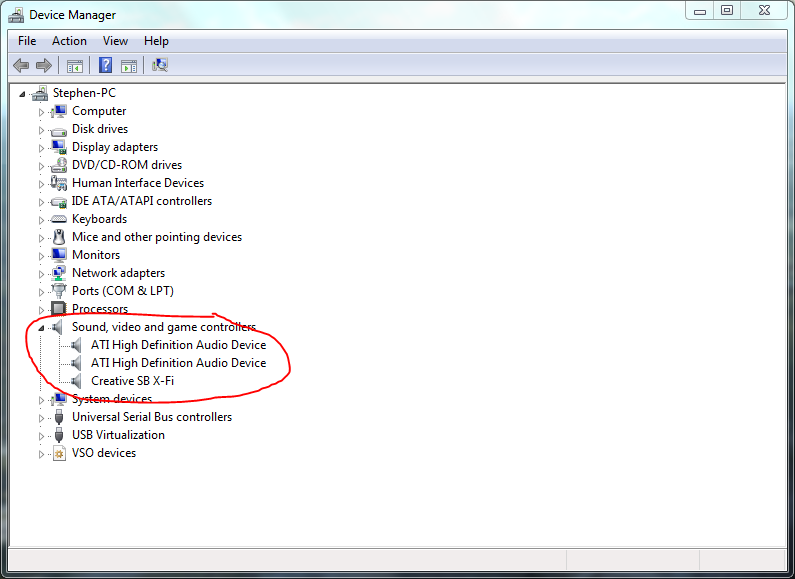
 Laptops for instance tend to just have the general volume controls. Is it saying there is a sound card in Device Manager? That's one way to check. Another is opening the volume panel and seeing if a device is listed (it's the only drop down menu at the top )
-
Yeah, go into device manager and look here:
-
12-09-2009, 10:35 AM #6
- Join Date
- Oct 2005
- Location
- Corby
- Posts
- 5,515
- Tokens
- 2,926
- Habbo
- cabbage (origins)
thanks guys
i managed to sort it late last night, turns out the sound I had enabled in BIOS was for my front panel + rep all round
no

 Reply With Quote




 Posting Permissions
- You may not post new threads
- You may not post replies
- You may not post attachments
- You may not edit your posts