


Basically, I want to use my TV as my monitor, I have the other cable needed, But would this work?
http://cgi.ebay.co.uk/NEW-VGA-TV-CON...#ht_1551wt_902
Results 1 to 10 of 17
Thread: Would this work?
-
 Would this work?
-
11-04-2011, 06:03 PM #2
Yes that should work !

-
11-04-2011, 09:10 PM #3
Yes it would but just make sure your TV has the right sockets. Modern TVs have a VGA socket in them though
-
11-04-2011, 09:20 PM #4

- Join Date
- Oct 2006
- Location
- Scotland
- Posts
- 224
- Tokens
- 471
- Habbo
- .-Richie-.
As markypee4 said, make sure your TV has the ports for these connectors to connect to. Are you sure your TV doesn’t have a VGA port already? I am not very familiar with TVs but that yellow, red and white connection ends looks quite confusing are you sure your TV can support these? I am not sure if these are the same as the more common connector with the pin in the middle.

-
Well, I just discovered I had one of them cables already, Tried it and no luck, I had the red yellow and white correct, And nope my TV does not have a VGA port, Its quite new too
 I have HDMI, Scart, Composite and Red, Yellow white.
Sucks, Im unsure why it didn't work
-
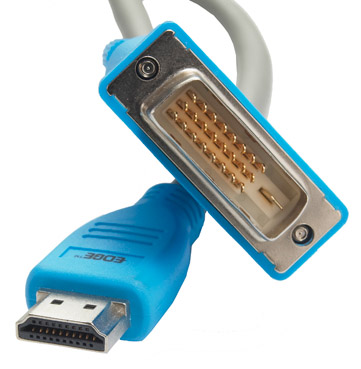
You can use the HDMI socket to connect your PC/Laptop, as long as you have a DVI socket on the computer. It looks like this;

Then you need to by a HDMI to DVI Cable like this;
-
 Originally Posted by RockyHorror

I don't have a very good graphics card, VGA and S-Video only
I have a VGA -> HDMI Cable, But it dont work, What a waste of money, Any other suggestions?
-
VGA > HDMI won't work without some sort of hardware, VGA is analogue, HDMI is digital. Originally Posted by Jaaaack!
-
If you're determined just buy a new graphics card, you can get them relatively cheap.
-
I have a brand new PCIE One sitting in a box next to me Originally Posted by RockyHorror
My motherboard broke a day before it arrived, Using my backup one which has AGP, can't afford a new mobo

 Reply With Quote





 Posting Permissions
- You may not post new threads
- You may not post replies
- You may not post attachments
- You may not edit your posts