


Urgent is there as I have one hour to order it so it arrives tomorrow.
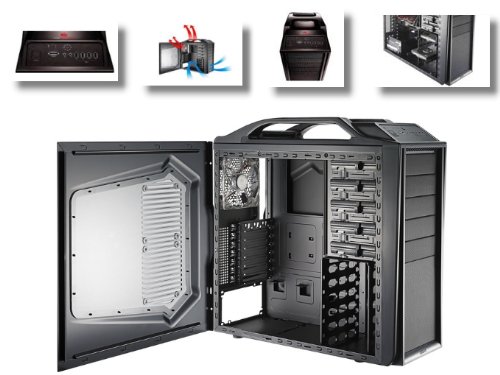
Basically, I need a drive bay to fit a second SSD in to my Coolermaster Storm Scout case.
Currently, I cannot fit the second one as I have used the brackets already for my other SSD, and the case on came with one set.
My case is one of the ones where you can easily clip hdd's in and out - so you don't screw them in to the case. I am struggling to find a bracket that allows me to do this.
Any recommendations? Case picture:
Needs to be from Amazon
Rep xx
Results 1 to 8 of 8
Thread: 2.5in to 3.5in bay [Urgent]
-
 2.5in to 3.5in bay [Urgent]
-
Does the SSD not come with a 2.5" to 3.5" adapter? I thought most did...
:8 Originally Posted by Chippiewill

-
That is what I thought! Even when that is the case I am lacking the screws - although I think I could find some screws. Originally Posted by Recursion
Would it would by just attaching one end of each SSD to a bracket (very sturdy bracket etc)??
-
So long as there aren't any circuit boards exposed on the SSD that touch anything metal, you can do whatever you want with them.
When my HDD died, I just took a 2.5" laptop HDD I had lying around, cable tied it to my case's 3.5" HDD brackets and I was away :8 Originally Posted by Chippiewill
-
I personally put my SSD in my computer by using a 2.5" -> 3.5" -> 5.25" and a hefty amount of duck tape (I too have those 'hot swap' style 3.5" bays and the adapters you get with SSDs are never compatible).
Chippiewill.

-
All sorted, used the idea of cable ties to keep the drive in with one half of the bracket for each SSD - worked a treat.
Finally got OSX and Windows 7 dualbooted on one 60GB SSD each with a 1TB File Storage (plus program files for Windows)
-
If you don't want to use RAID then turn on AHCI in your drive controller and enable TRIM in windows (Cleans up data on the drive).
Then shift all of your cache files onto the storage (Windows: http://forum.corsair.com/forums/showthread.php?t=82516)
I also noticed that you're using Chrome on OSX which likely means the same for Windows. You can change the location that it saves the browser cache by adding " --user-data-dir="L:\CHROME CACHE"" (Change path to whatever) to the launch params on windows. No idea how you do it on mac. I cannot stress how important this is, it can absolutely wreck SSD performance.
Also if you use steam you can use symbolic links to make it install games onto a seperate drive which is what I personally use:
http://technet.microsoft.com/en-us/l...94(WS.10).aspxLast edited by Chippiewill; 14-01-2012 at 12:45 PM.
Chippiewill.
-
Currently using AHCI as it needed to be configured with it to install OSX (well, the guide told you to). Considering RAID anyway though - "speed junkie 2k12". Will enable TRIM on Windows this evening. Will do the bit on Chrome too. That is useful for STEAM. To be honest, on Mac it is there purely to talk to a few friends. On Windows I have installed it on the file storage drive, as I am only putting key programs (office, adobe, editing, chrome) on the SSD for now so I don't fill it up too quickly, but that link you posted could come in useful as I didn't put STEAM on the SSD as I knew my games would rape the space.. Originally Posted by Chippiewill
Thanks for the help x

 Reply With Quote


 Posting Permissions
- You may not post new threads
- You may not post replies
- You may not post attachments
- You may not edit your posts